
The floor plan assistant
Ask questions about your map and describe changes in plain language, then review them before they apply.
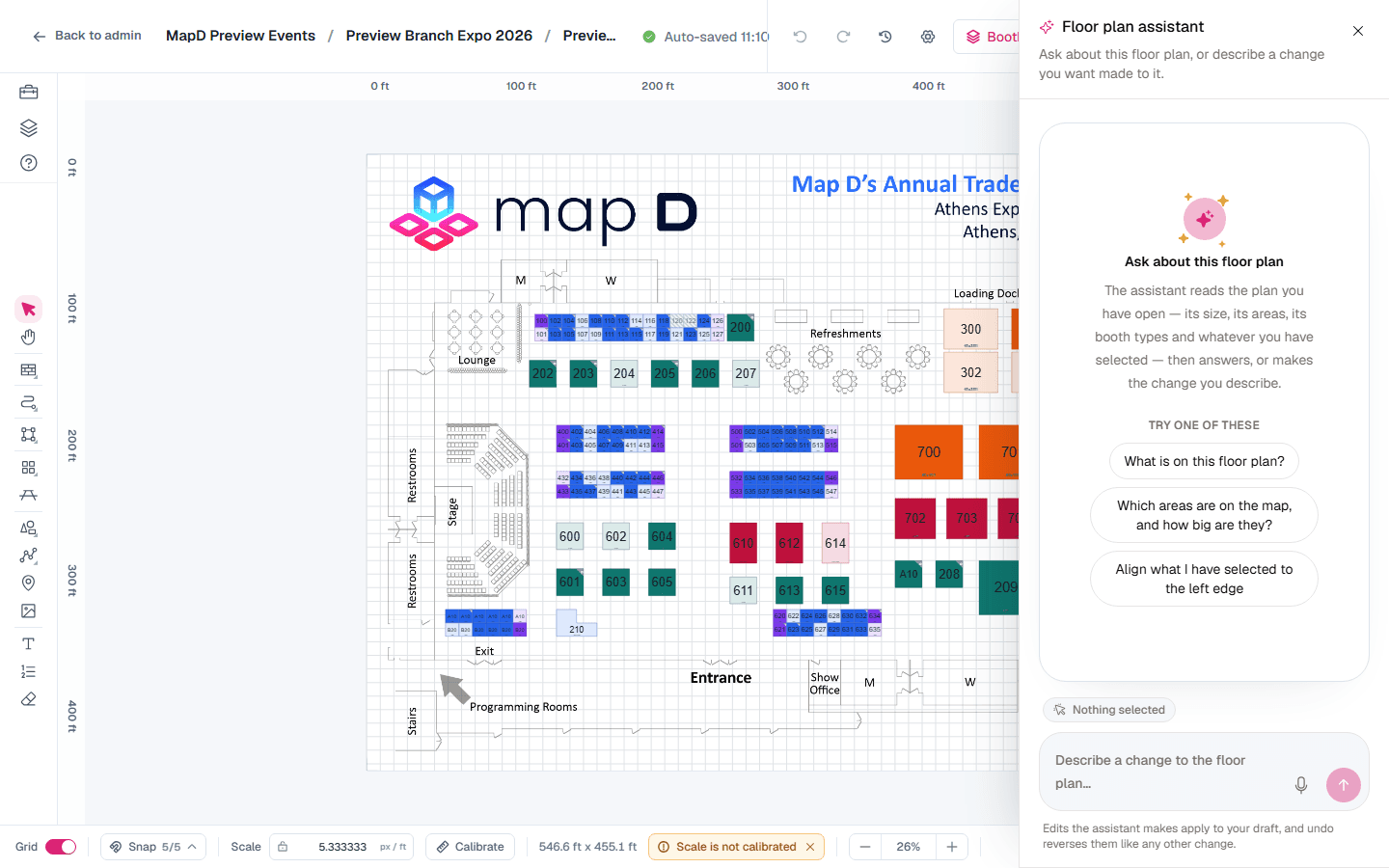
The floor plan assistant answers questions about the map you have open and makes changes you describe in plain language. Select Ask the assistant in the bottom right corner of the map editor.
What you can ask
The assistant reads your map's size, areas, booth types and whatever you have selected. Try:
- "What is on this floor plan?"
- "Which areas are on the map, and how big are they?"
- "Align what I have selected to the left edge."
You can also type short commands: /align, /distribute, /rotate, /arrange, /duplicate, /group, /ungroup, /rename, /lock, /unlock and /delete.
Nothing changes until you approve
When you ask for a change, the assistant drafts it and shows Proposed changes. Nothing moves yet.
Review
Switch between Proposed and End result to compare. Untick anything you do not want.
Apply, refine or discard
Select Apply to make the changes, Refine to ask for something different, or Discard to drop them.
Booths that are already assigned to exhibitors are left out of proposed changes unless you choose to include them. Applied changes go into your draft, like any other edit, and one undo reverses the whole change.
For questions about your shows beyond the floor plan, see The AI Assistant.
Still need help?
Contact your Map D account team. Include your show name and, if something looks wrong, a screenshot of the page.
Last updated September 25, 2026