
Connect Claude or ChatGPT
Give your own AI assistant read-only access to your Map D data, and disconnect it when you are done.
Connect Claude or ChatGPT to Map D and ask about your shows from the assistant you already use. The connection is read-only and never has more access than your own Map D account.
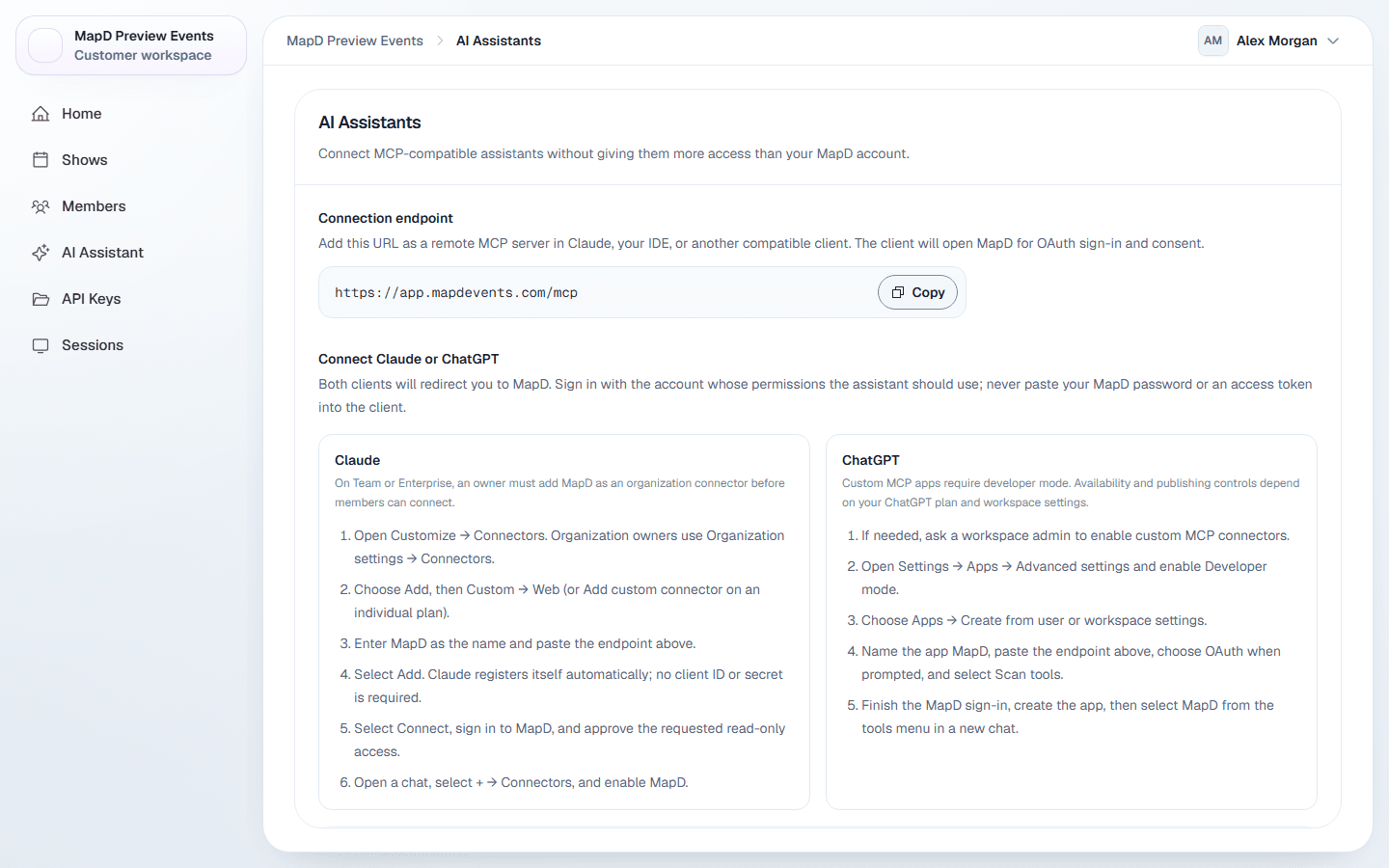
Connect
Open AI Assistants
Select your name in the top right corner, then AI Assistants.
Copy the connection endpoint
Under Connection endpoint, select Copy.Add it to your assistant
Follow the steps on the page for Claude or ChatGPT. You sign in to Map D and approve read-only access. No client ID or secret is needed.
The full setup guide, with a step for each assistant, is in the Map D MCP documentation.
What assistants can read
Assistants see what your role can see: your shows, published floor plans, exhibitors, speakers, sessions and sponsors, plus booth inventory and sales summaries if your role includes them.
They cannot make changes, run workflows, or read credentials, private notes, individual orders or exports.
Disconnect an assistant
Connected assistants on the AI Assistants page lists every assistant linked to your account and when it connected. Select Disconnect to remove its access immediately.
Still need help?
Contact your Map D account team. Include your show name and, if something looks wrong, a screenshot of the page.
Last updated September 25, 2026