
Edit your company profile
Update your company name, logo, description, categories, contact details and social links.
Your company profile is what attendees see on the show's Homebase and in the mobile app. Keep it complete and current: it is often the first thing a visitor reads about you.
Open Edit profile
On My Profiles, find the row for the show and select Edit profile.
Fill in each tab
Work through the tabs described below.Select Save changes
Changes on Main Profile and Contact are saved together when you select Save changes.
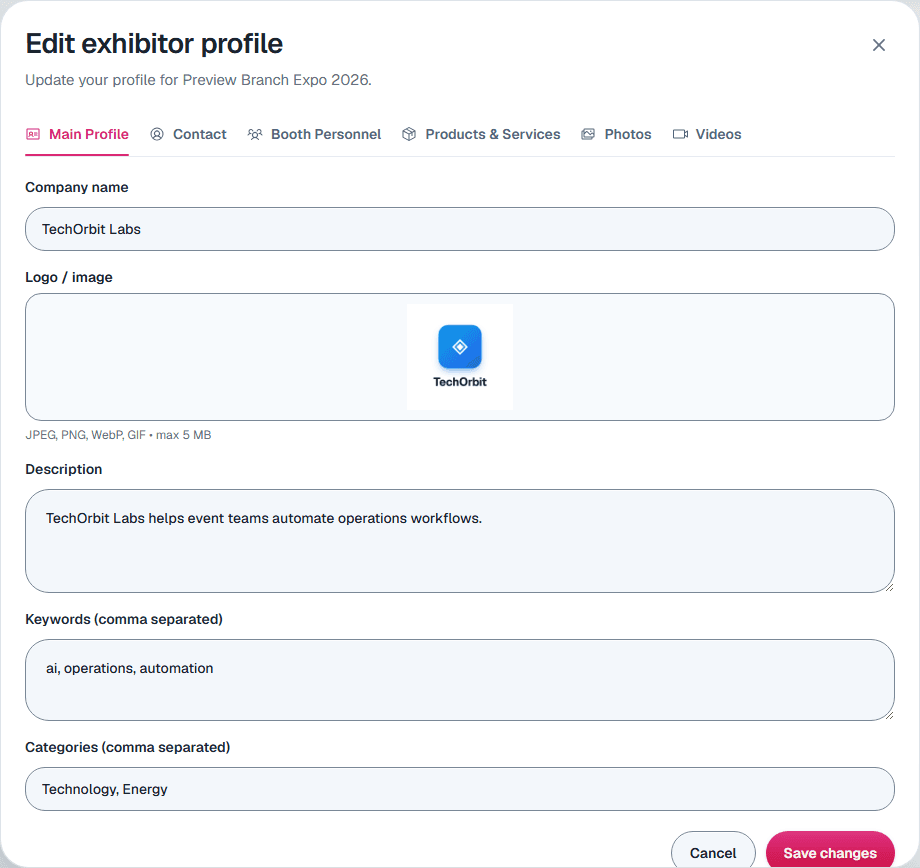
Main Profile
- Company name
- Logo / image: GIF, JPG, PNG or WebP, up to 5 MB.
- Description: what your company does and what visitors will find at your booth.
- Keywords: separate each one with a comma. Visitors search on these.
- Categories: separate each one with a comma. They help visitors filter the exhibitor list.
Contact
- Contact details: primary contact, email, title, phone, fax and website. These are shown publicly, so use a general sales or info address if you prefer.
- Address: street, city, state or province, postal code and country.
- Social links: Facebook, Instagram, LinkedIn, X, YouTube, TikTok and Pinterest.
Staff, products, photos and videos
Your organizer decides which of these tabs you see: Booth Personnel, Products & Services, Photos and Videos. Unlike the first two tabs, each item on these tabs saves on its own as soon as you add or edit it.
Show questions
If your organizer added their own questions for exhibitors, they're on the Show questions tab. Answer them and select Save answers. Some answers appear on your public profile, and some only your organizer sees; the note under each question says which. A question marked Only the organizer can change it shows the organizer's answer and can't be edited.
Still need help?
For questions about your show, booth or invoice, contact your show organizer. Their contact details are in your invite and order emails. Who to ask
Last updated September 30, 2026